> ## Documentation Index
> Fetch the complete documentation index at: https://guide.garde.app/llms.txt
> Use this file to discover all available pages before exploring further.
# Overview
> Close your books faster with Garde's restaurant accounting automations.
Close your books faster with our accounting automations! The **Accounting** section turns sales, inventory, and delivery activity into journal entries you review and export to QuickBooks. The value is simple: books that used to close weeks after month-end can close within days, because the entries write themselves daily.
## Introduction
We have several restaurant-focused automations such as:
* **Delivery Journals** help your accountants save 40-60 minutes per location per month on delivery reconciliation.
* **Daily Sales Journals** help your accountants save 30-60 minutes per location per month on POS sales reconciliation.
## How are we different?
We differentiate ourselves by making our journal entries more thorough and accurate than our competitors.
For example, for Toast entries, MarginEdge doesn't consider cash drawer activity, doesn't properly handle all delivery platforms for tracking payments, and doesn't properly accrue scheduled orders.
Connection and mapping setup is covered in [QuickBooks](/platform/accounting-quickbooks); the rest of this page is the working rhythm.
## Start at Accounting Home
**Accounting → Home** is the multi-location scoreboard. Everything that needs attention across the chain, one screen.
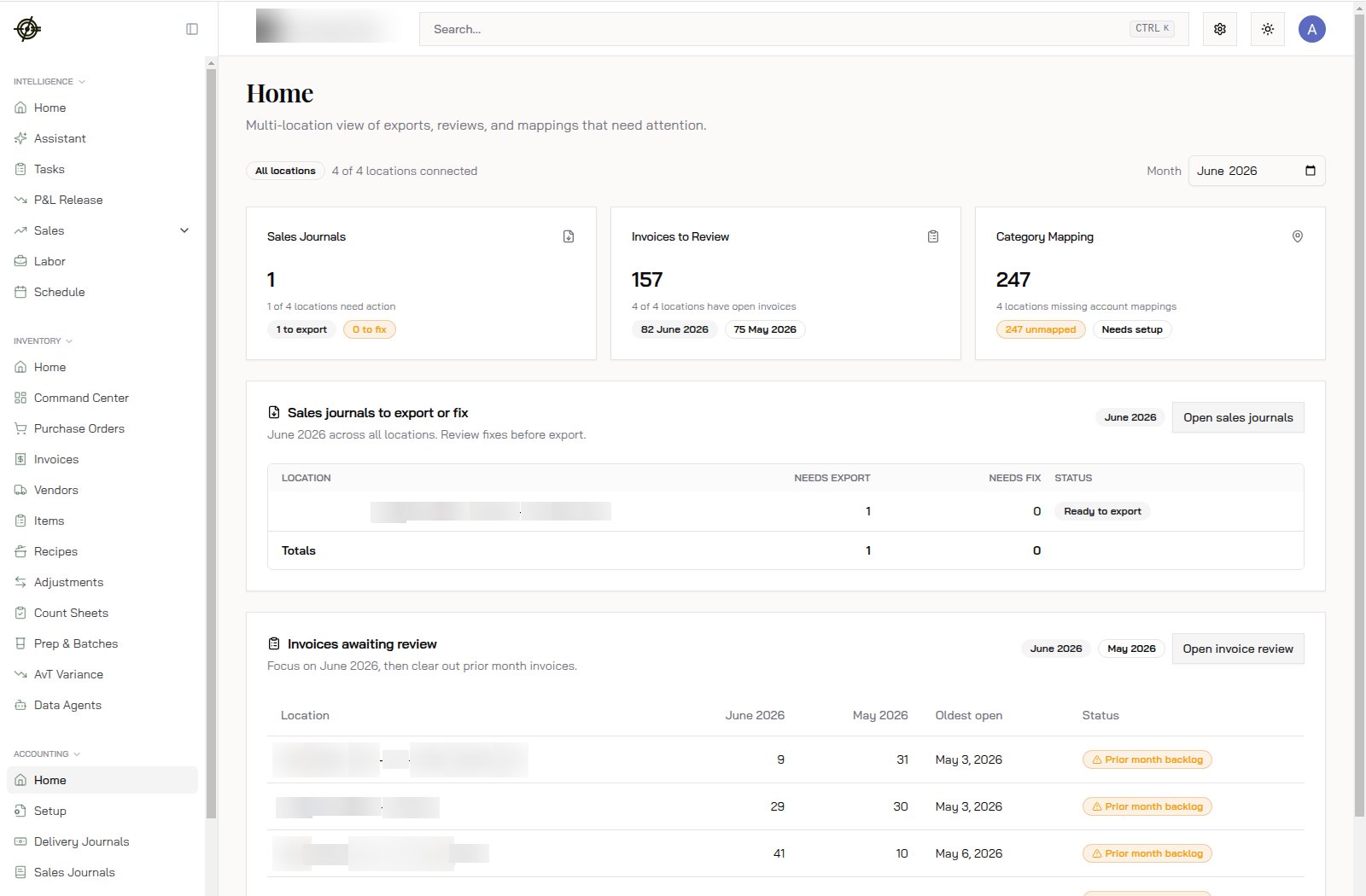 Three cards at the top:
* **Sales Journals**: how many are waiting to export or need a fix. "1 to export, 0 to fix" is a good morning.
* **Invoices to Review**: open invoices per location, by month. 157 open with 75 still sitting in the prior month means the backlog is compounding. The **Prior month backlog** badge per location tells you exactly who's behind.
* **Category Mapping**: unmapped accounts. 247 unmapped means exports will fail or land in the wrong accounts. This number should be zero.
The tables below break each card down by location. Work oldest first: the **Oldest open** column exists because a May invoice reviewed in July helps nobody.
## Sales journals
Every day's POS activity becomes a balanced journal entry: sales, taxes, tips, payments.
Three cards at the top:
* **Sales Journals**: how many are waiting to export or need a fix. "1 to export, 0 to fix" is a good morning.
* **Invoices to Review**: open invoices per location, by month. 157 open with 75 still sitting in the prior month means the backlog is compounding. The **Prior month backlog** badge per location tells you exactly who's behind.
* **Category Mapping**: unmapped accounts. 247 unmapped means exports will fail or land in the wrong accounts. This number should be zero.
The tables below break each card down by location. Work oldest first: the **Oldest open** column exists because a May invoice reviewed in July helps nobody.
## Sales journals
Every day's POS activity becomes a balanced journal entry: sales, taxes, tips, payments.
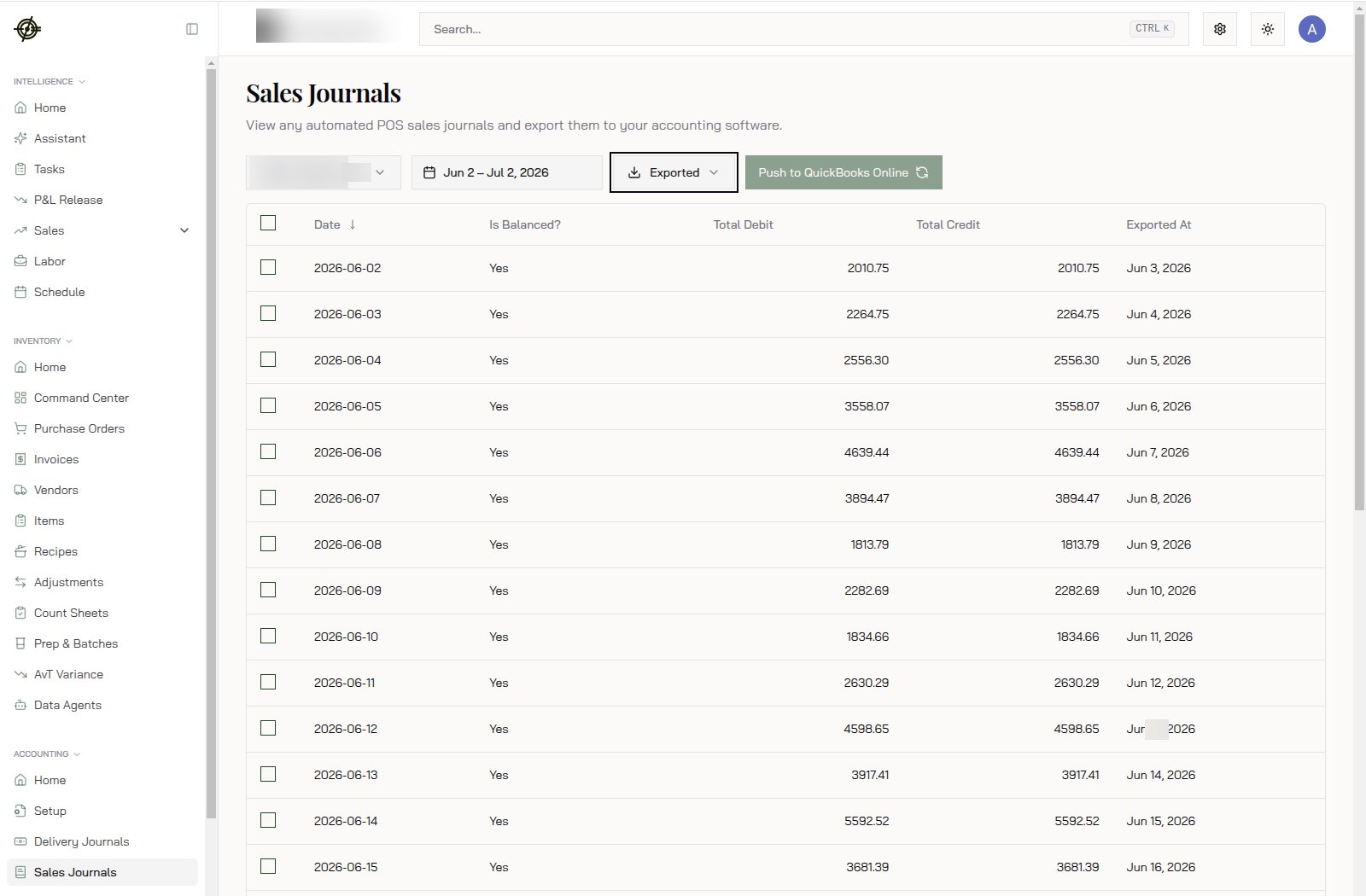 1. Open **Sales Journals** and pick the date range.
2. Check the **Is Balanced?** column. Balanced entries with matching debits and credits are ready. An unbalanced day means an unmapped payment type or sales category; fix the mapping, not the entry.
3. Select the days and hit **Push to QuickBooks Online**. The **Exported At** column confirms what already went over.
Once mappings are set, this is minutes per week, not days per month.
## Inventory journals
After each inventory count, open **Inventory Journals** and generate the COGS entry from the count session. Review, then export. No count, no accurate COGS. Nag the store to [finish counts](/dashboard/inventory) on schedule.
## Delivery deposits
Delivery platforms pay you in lump sums with fees buried inside.
1. Download the statement from DoorDash / Uber Eats / Grubhub / ezCater.
2. Upload it under **Delivery Deposits**.
3. Sync. Garde breaks the payout into sales, commissions, and fees and posts it.
Do this weekly as statements arrive. Commission errors only surface when someone actually reconciles.
## Mappings
**Setup** holds all the mappings: sales, category accounts, invoice/bill accounts, delivery, and commissary. Set them once, then touch them only when the chart of accounts changes.
* Most export failures trace back to an unmapped account. Check here first.
* Renamed or deleted an account in QuickBooks? Re-map it here before the next export.
## The rhythm
* Daily: nothing. Journals generate themselves.
* Weekly: export sales journals, upload delivery statements, clear the invoice review queue.
* After each count: generate and export the inventory journal.
* Monthly: confirm Accounting Home shows zeros before you call the month closed.
## Know-how
* The month picker on Accounting Home scopes the whole page. Reviewing June? Make sure it says June.
* "4 of 4 locations connected" at the top confirms every store's QuickBooks link is alive. A disconnected location looks exactly like missing data.
* Invoices reach accounting from the [Inventory invoice queue](/dashboard/inventory). If the review count here looks wrong, the fix is usually upstream in invoice approval, not in accounting.
1. Open **Sales Journals** and pick the date range.
2. Check the **Is Balanced?** column. Balanced entries with matching debits and credits are ready. An unbalanced day means an unmapped payment type or sales category; fix the mapping, not the entry.
3. Select the days and hit **Push to QuickBooks Online**. The **Exported At** column confirms what already went over.
Once mappings are set, this is minutes per week, not days per month.
## Inventory journals
After each inventory count, open **Inventory Journals** and generate the COGS entry from the count session. Review, then export. No count, no accurate COGS. Nag the store to [finish counts](/dashboard/inventory) on schedule.
## Delivery deposits
Delivery platforms pay you in lump sums with fees buried inside.
1. Download the statement from DoorDash / Uber Eats / Grubhub / ezCater.
2. Upload it under **Delivery Deposits**.
3. Sync. Garde breaks the payout into sales, commissions, and fees and posts it.
Do this weekly as statements arrive. Commission errors only surface when someone actually reconciles.
## Mappings
**Setup** holds all the mappings: sales, category accounts, invoice/bill accounts, delivery, and commissary. Set them once, then touch them only when the chart of accounts changes.
* Most export failures trace back to an unmapped account. Check here first.
* Renamed or deleted an account in QuickBooks? Re-map it here before the next export.
## The rhythm
* Daily: nothing. Journals generate themselves.
* Weekly: export sales journals, upload delivery statements, clear the invoice review queue.
* After each count: generate and export the inventory journal.
* Monthly: confirm Accounting Home shows zeros before you call the month closed.
## Know-how
* The month picker on Accounting Home scopes the whole page. Reviewing June? Make sure it says June.
* "4 of 4 locations connected" at the top confirms every store's QuickBooks link is alive. A disconnected location looks exactly like missing data.
* Invoices reach accounting from the [Inventory invoice queue](/dashboard/inventory). If the review count here looks wrong, the fix is usually upstream in invoice approval, not in accounting.