> ## Documentation Index
> Fetch the complete documentation index at: https://guide.garde.app/llms.txt
> Use this file to discover all available pages before exploring further.
# Logging waste & transfers
> Two minutes a day here buys a variance report you can trust at month end.
**Who:** everyone on shift — ideally the shift lead owns it.
**When:** as it happens, or in one pass at close.
Unlogged waste doesn't disappear. It shows up at month end as unexplained [AvT variance](/operating-guide/monthly-avt-variance), where it's indistinguishable from theft or over-portioning.
## Log an adjustment
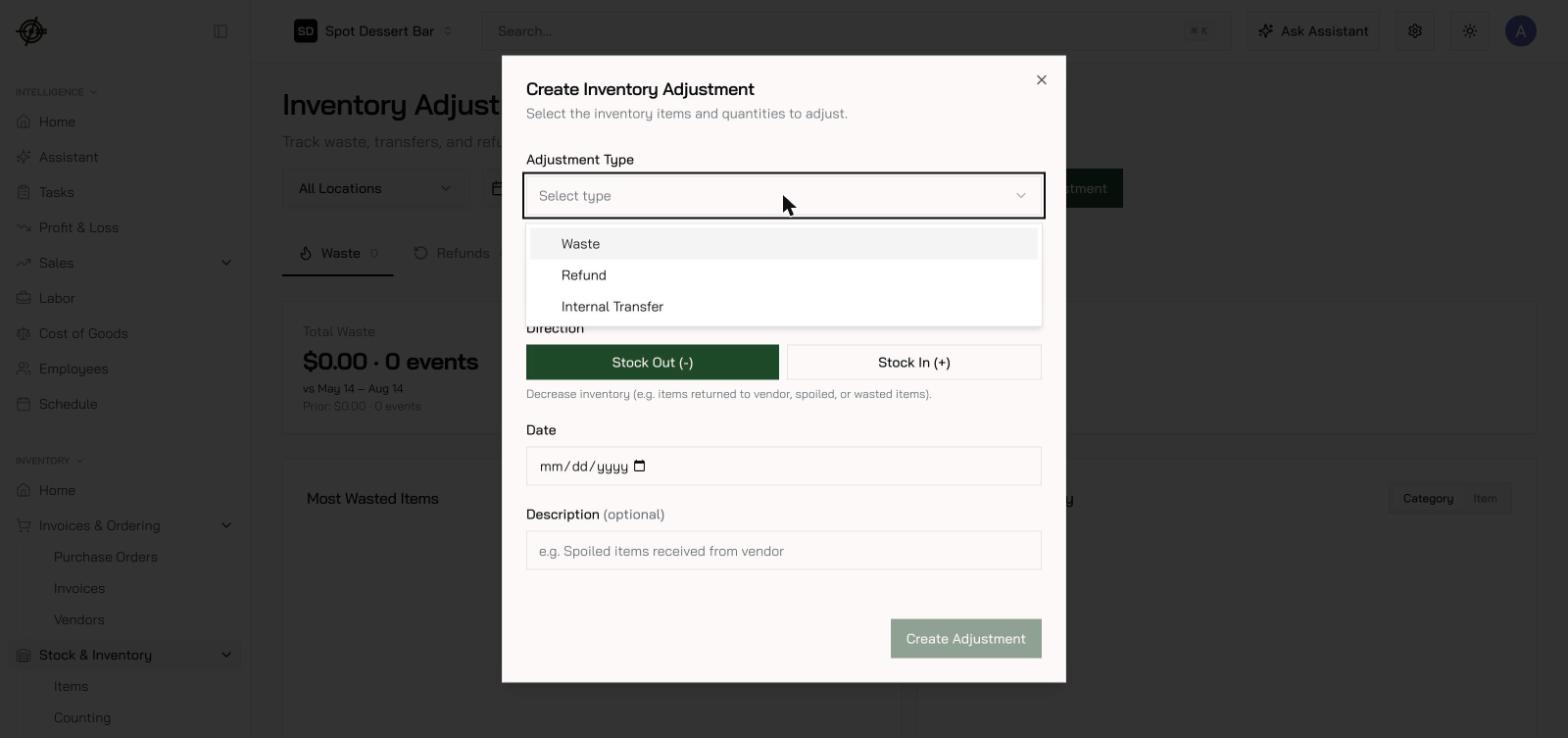
1. Go to **Inventory → Stock & Inventory → Adjustments**.
2. Press **New Adjustment**.
3. Pick the **Adjustment Type**:
* **Waste** — spoilage, spills, over-portioning, tracked comps.
* **Refund** — product going back to the vendor for credit.
* **Internal Transfer** — product moving between your locations.
4. Set the **Direction** — **Stock Out (-)** for waste and refunds. Only refunds can flip to **Stock In (+)** for a correction the other way; waste locks to Stock Out, and transfers ask for locations instead.
5. Select item, quantity, unit, and date. Transfers also need a **From location** and a **Transfer to** destination.
 ## What happens next
* **Waste and refunds** adjust stock immediately.
* **Transfers** create an approval request — the receiving side confirms before inventory moves, which keeps both locations' counts honest. The sending side can edit while the request is pending, the other side gets an email at every step, and each transfer keeps a full activity history.
* Do this on the phone: the [Garde app](/mobile/inventory#log-waste-from-a-preset-list)'s **Waste Log** turns the close-of-shift sweep into a preset list, and its **Adjustments** card covers one-off waste, refunds, and transfers — log it where you found it.
Make it a ritual: build a **Waste Log template** of the usual suspects in the Garde app and have the closer step through it every night. Consistency beats precision — a rough daily log is worth more than a perfect weekly one.
## What happens next
* **Waste and refunds** adjust stock immediately.
* **Transfers** create an approval request — the receiving side confirms before inventory moves, which keeps both locations' counts honest. The sending side can edit while the request is pending, the other side gets an email at every step, and each transfer keeps a full activity history.
* Do this on the phone: the [Garde app](/mobile/inventory#log-waste-from-a-preset-list)'s **Waste Log** turns the close-of-shift sweep into a preset list, and its **Adjustments** card covers one-off waste, refunds, and transfers — log it where you found it.
Make it a ritual: build a **Waste Log template** of the usual suspects in the Garde app and have the closer step through it every night. Consistency beats precision — a rough daily log is worth more than a perfect weekly one.