> ## Documentation Index
> Fetch the complete documentation index at: https://guide.garde.app/llms.txt
> Use this file to discover all available pages before exploring further.
# Closing the books
> The monthly close ritual — journals flow daily, the close is a checklist.
**Who:** your accountant or bookkeeper.
**When:** journals flow daily; the close ritual is monthly.
Garde turns POS sales, approved invoices, and completed counts into journal entries and pushes them to QuickBooks. The deep reference lives in the [Accounting section](/accounting/overview) — this page is the monthly ritual.
## The cockpit
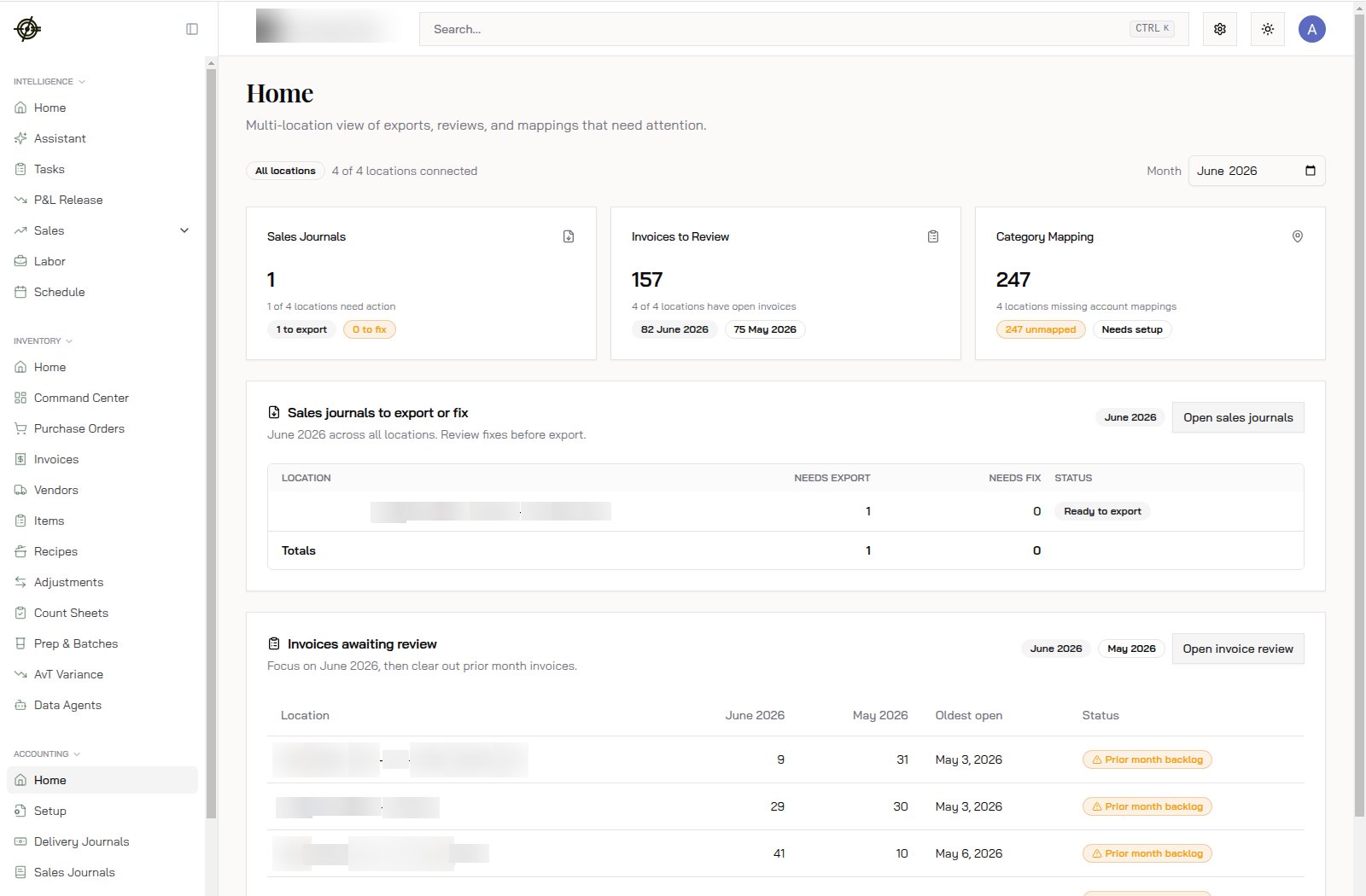
**Accounting → Home** shows every location for the selected month with a status badge — **Clear**, **Ready to export**, **Fix required**, **Needs setup**, **Prior month backlog** — plus cards for **Sales Journals**, **Invoices to Review**, and **Category Mapping**.
 ## The three journals
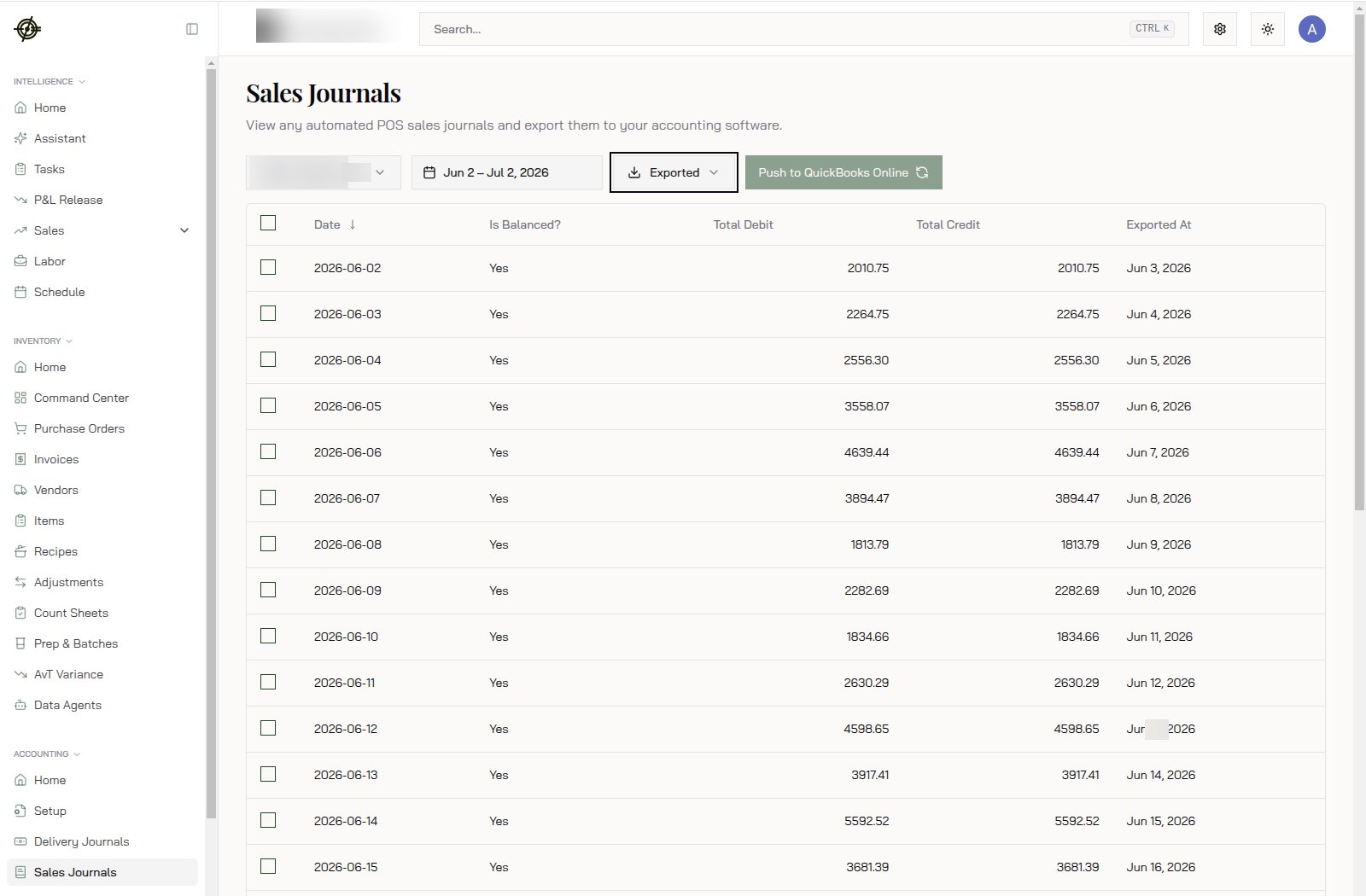
* **Sales Journals** — one entry per location per day from your POS. Review, then export — or enable **Auto-Export Daily Sales Journal** in Chain Settings and only touch exceptions. See the [Daily Sales Journal guide](/accounting/daily-sales-journal/introduction).
* **Inventory Journals** — period entries turning approved invoices and completed counts into COGS and inventory movements.
* **Delivery Journals** — reconciles third-party deposits (DoorDash, UberEats, Grubhub) against sales, fees, and payouts. See the [Delivery Journals guide](/accounting/delivery-journals/introduction).
## The three journals
* **Sales Journals** — one entry per location per day from your POS. Review, then export — or enable **Auto-Export Daily Sales Journal** in Chain Settings and only touch exceptions. See the [Daily Sales Journal guide](/accounting/daily-sales-journal/introduction).
* **Inventory Journals** — period entries turning approved invoices and completed counts into COGS and inventory movements.
* **Delivery Journals** — reconciles third-party deposits (DoorDash, UberEats, Grubhub) against sales, fees, and payouts. See the [Delivery Journals guide](/accounting/delivery-journals/introduction).
 ## The close, in order
1. Every invoice for the month **approved** — the Invoices to Review card reads zero ([daily habit](/operating-guide/daily-invoices) paying off). Each invoice carries its own export status, and blocked ones name exactly what's missing.
2. Month-end **counts completed** at every location ([monthly counts](/operating-guide/monthly-counts)).
3. Clear **Fix required** and **unmapped** badges — unmapped categories or accounts block export. Mappings live under **Accounting → Setup**.
4. Export everything **Ready to export**; reconcile in QuickBooks.
## The close, in order
1. Every invoice for the month **approved** — the Invoices to Review card reads zero ([daily habit](/operating-guide/daily-invoices) paying off). Each invoice carries its own export status, and blocked ones name exactly what's missing.
2. Month-end **counts completed** at every location ([monthly counts](/operating-guide/monthly-counts)).
3. Clear **Fix required** and **unmapped** badges — unmapped categories or accounts block export. Mappings live under **Accounting → Setup**.
4. Export everything **Ready to export**; reconcile in QuickBooks.