> ## Documentation Index
> Fetch the complete documentation index at: https://guide.garde.app/llms.txt
> Use this file to discover all available pages before exploring further.
# Monthly inventory counts
> The anchor of variance, inventory journals, and your P&L.
**Who:** split the store into sections and divide the crew; a manager owns completion.
**When:** the last day of the month, after close. Same day every time.
## Before count day (one-time setup)
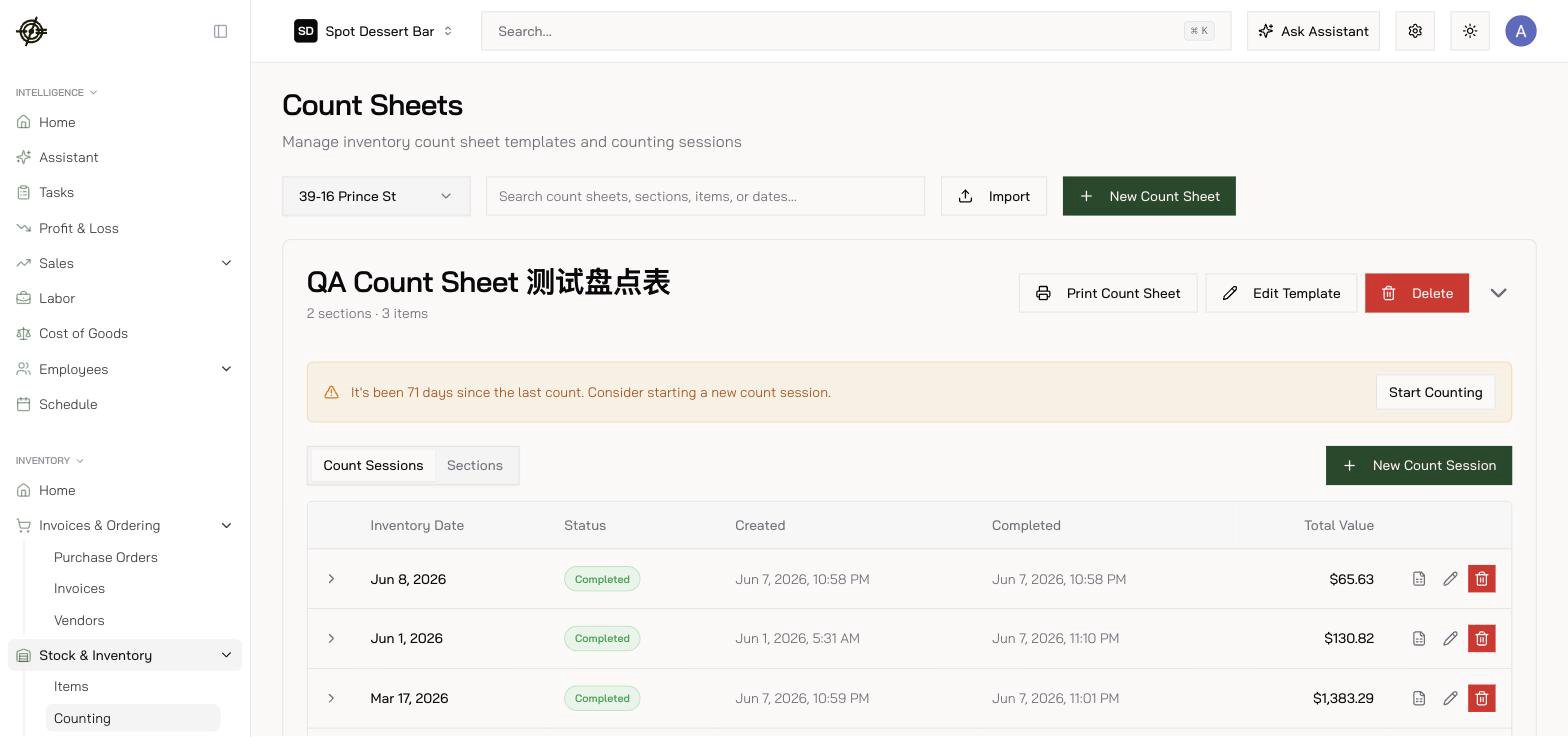
Build **count sheets** under **Inventory → Stock & Inventory → Counting** — one per area (walk-in, dry storage, bar, freezer) or one master monthly sheet. Order items to match the physical walk path, and make sure each item's **count sizes** match how you actually count it (case / inner pack / each). You can **bulk-upload a sheet from a file**, the same item can appear in different sections at different units, and **Print Count Sheet** opens a printable PDF for clipboard counts.
 ## Run the count
1. Open your count sheet, press **New Count Session** — or continue a draft.
2. Set the **Inventory Date** — the count represents your *starting stock* on that date (as of your location's closeout time, 4:00 AM by default), so use your period-end date even if you finish after midnight.
## Run the count
1. Open your count sheet, press **New Count Session** — or continue a draft.
2. Set the **Inventory Date** — the count represents your *starting stock* on that date (as of your location's closeout time, 4:00 AM by default), so use your period-end date even if you finish after midnight.
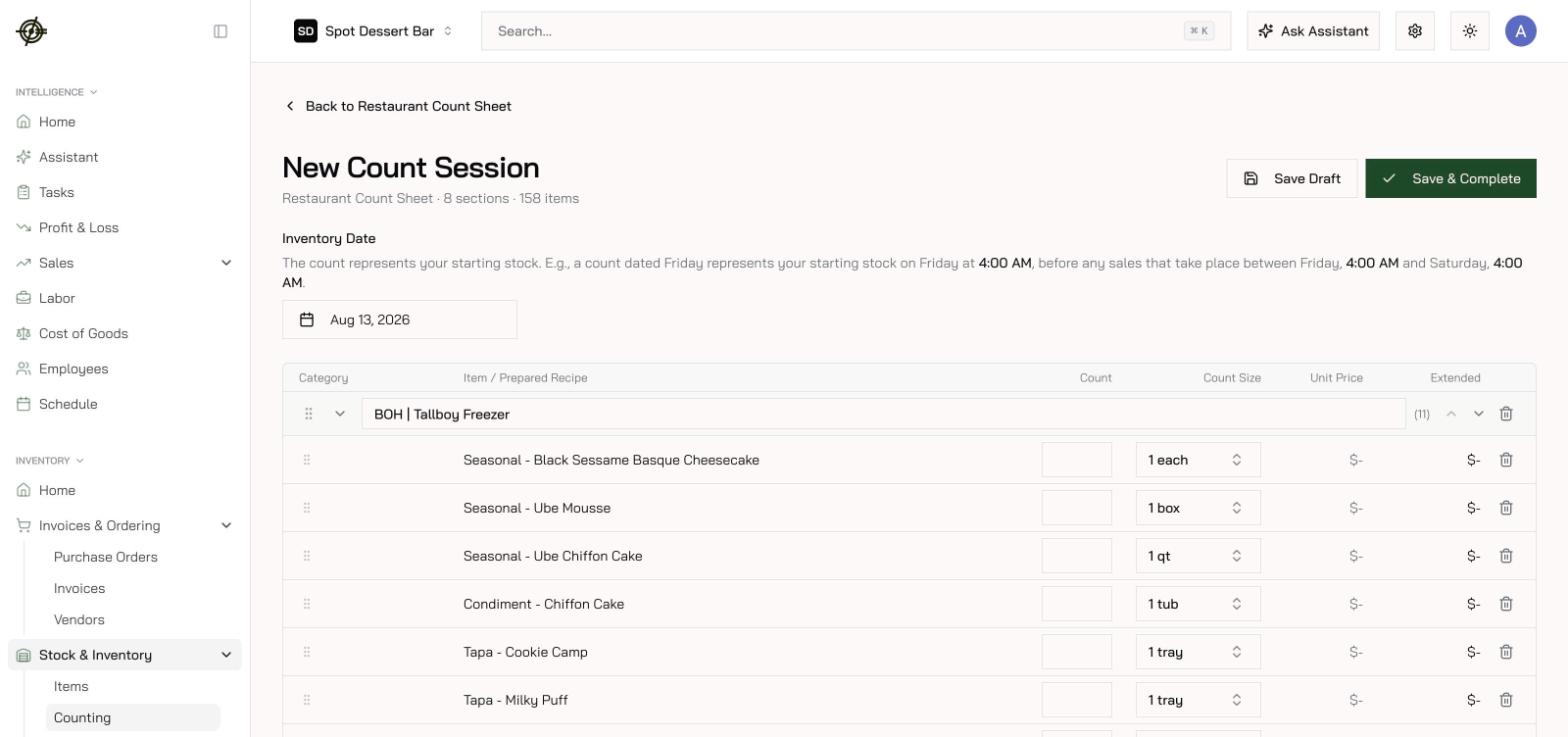 3\. Start counting and walk the shelves — count from the [Garde app](/mobile/inventory#run-a-count-sheet): phones in the walk-in beat clipboards, and it keeps working with no signal:
* The built-in **calculator** handles partial cases.
* **Switch units anytime** (case, bottle, each). Switching doesn't reset — quantities in different units **add up** for the same item.
* Counting works **offline**; it syncs when you're back on WiFi.
* Saves are **section-scoped**, so two people can count different sections of the same session at once.
4. Use **search and filters** to jump around — and to check **what hasn't been counted** before finishing.
5. **Save Draft** to pause anytime; **Save & Complete** when the walk is done. Only completed sessions feed variance and accounting. A completed session can still be **edited** if you find an error, and any session **exports to Excel**.
**Count-day rules:** count *everything* on the sheet (a skipped item reads as zero and poisons variance). Don't receive deliveries mid-count. One person per section — double-counting is worse than no count.
3\. Start counting and walk the shelves — count from the [Garde app](/mobile/inventory#run-a-count-sheet): phones in the walk-in beat clipboards, and it keeps working with no signal:
* The built-in **calculator** handles partial cases.
* **Switch units anytime** (case, bottle, each). Switching doesn't reset — quantities in different units **add up** for the same item.
* Counting works **offline**; it syncs when you're back on WiFi.
* Saves are **section-scoped**, so two people can count different sections of the same session at once.
4. Use **search and filters** to jump around — and to check **what hasn't been counted** before finishing.
5. **Save Draft** to pause anytime; **Save & Complete** when the walk is done. Only completed sessions feed variance and accounting. A completed session can still be **edited** if you find an error, and any session **exports to Excel**.
**Count-day rules:** count *everything* on the sheet (a skipped item reads as zero and poisons variance). Don't receive deliveries mid-count. One person per section — double-counting is worse than no count.