> ## Documentation Index
> Fetch the complete documentation index at: https://guide.garde.app/llms.txt
> Use this file to discover all available pages before exploring further.
# Items, units & count sizes
> Get units right once and costing, counting, and ordering all just work.
**Who:** whoever owns your inventory data — usually the GM or ops lead.
**When:** onboarding, then touch-ups as the menu evolves.
Items are the atoms of Garde. The [Inventory reference](/dashboard/inventory) tours the pages; this guide is about getting the *data* right.
## The catalog
**Inventory → Stock & Inventory → Items** is a two-pane browser: categories left (with red *need mapping* warnings when items lack vendor links), items right with count size, latest vendor, and cost. Use the location picker for store-specific costs, and the **Inventoried only** toggle to hide non-counted items.
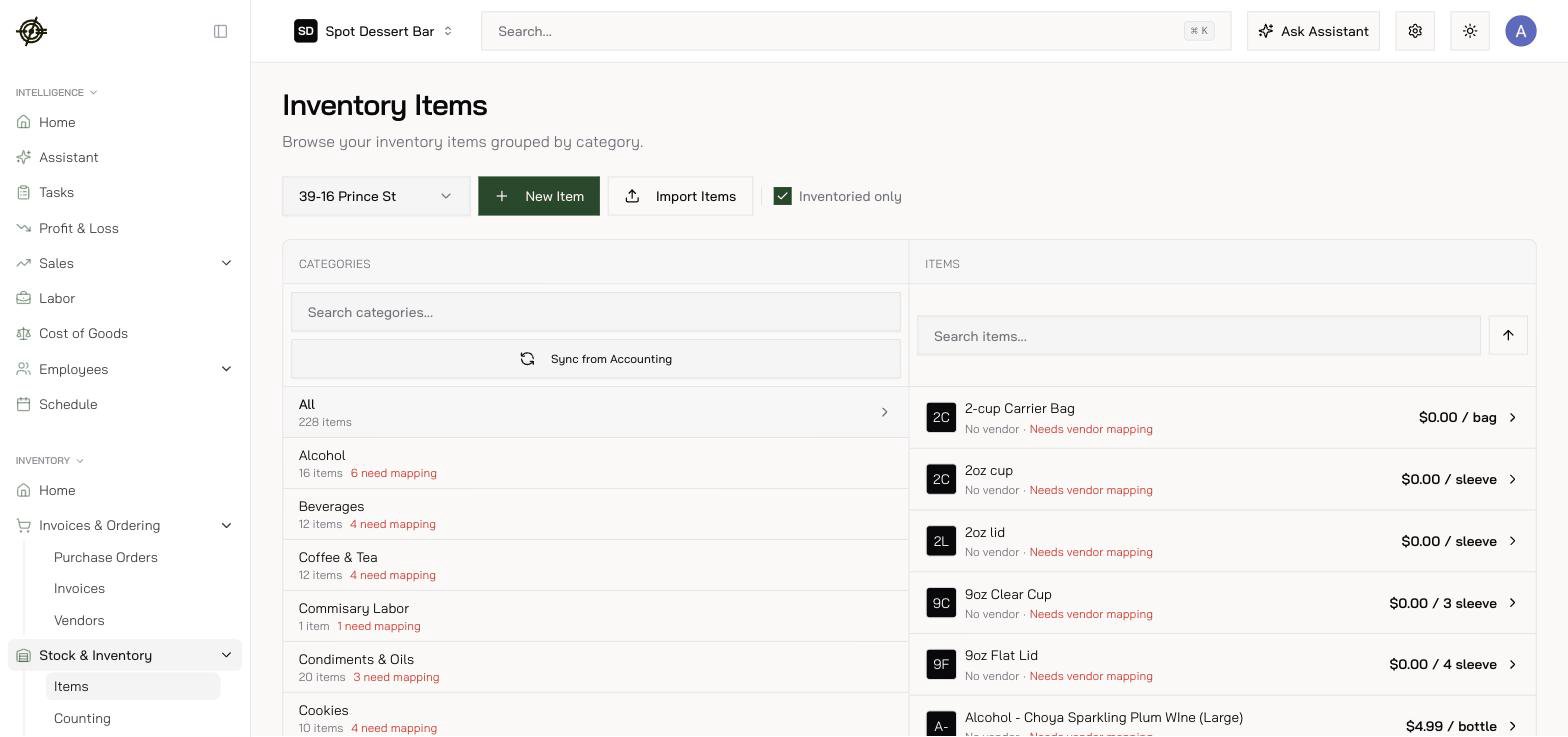 * **Import Items** bulk-creates from pasted names (*Type Items*) or a CSV/XLSX/PDF/photo (*Upload File*). AI parses drafts, flags *possible duplicates*, and walks you through approve/skip review.
* Deleting a category asks where to **merge its items** — nothing is orphaned.
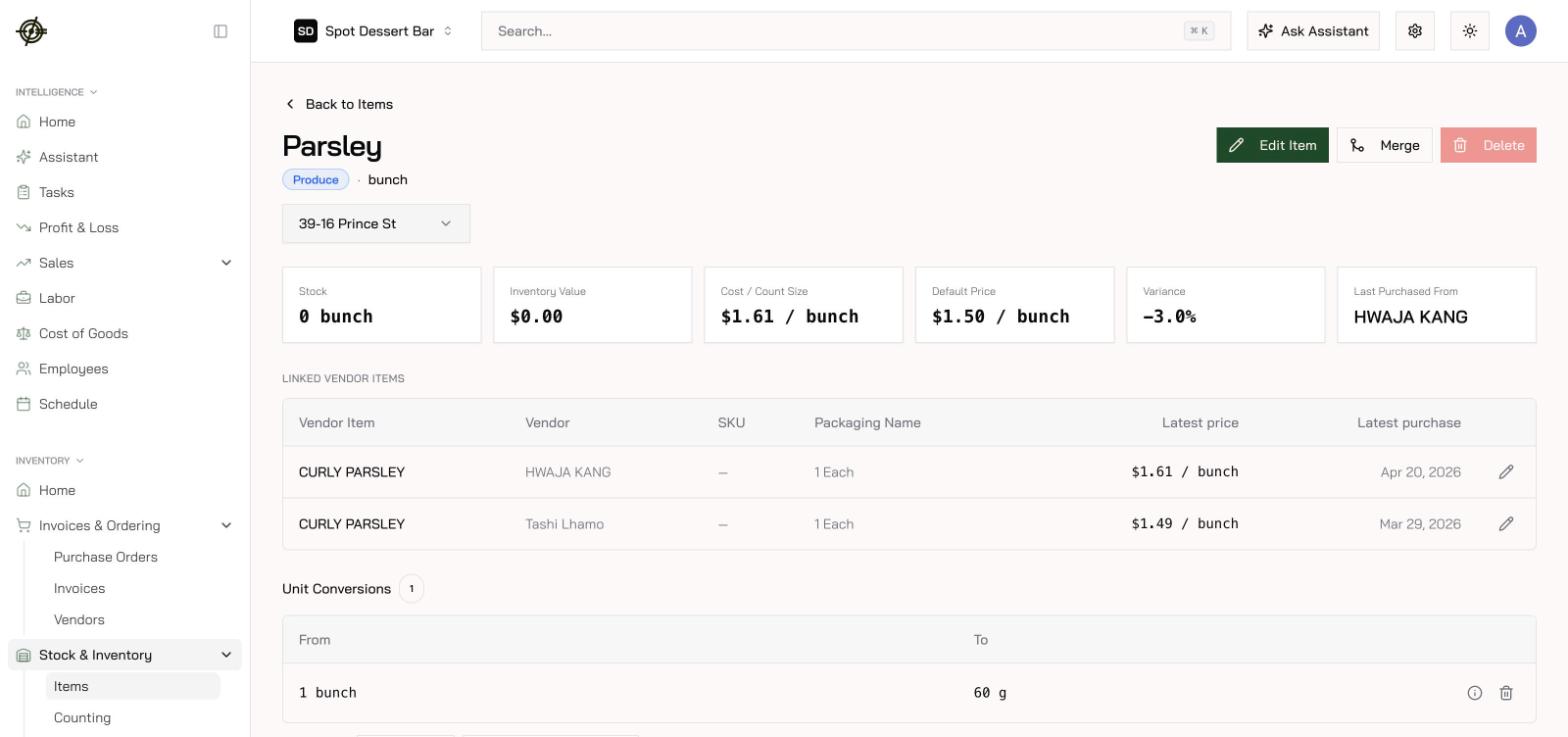
* Click any item for stock vs par, inventory value, cost per count size, linked vendor items, price history, photos, and every count that touched it.
* **Import Items** bulk-creates from pasted names (*Type Items*) or a CSV/XLSX/PDF/photo (*Upload File*). AI parses drafts, flags *possible duplicates*, and walks you through approve/skip review.
* Deleting a category asks where to **merge its items** — nothing is orphaned.
* Click any item for stock vs par, inventory value, cost per count size, linked vendor items, price history, photos, and every count that touched it.
 Two settings worth switching on:
* **Expiration policies** — how long items stay good, with a preview before applying. This powers the *expired — pull from stock* and *expiring soon — sell first* alerts on Inventory Home.
* **Alternative names by language** — a dialog on each item that gives it a different name in English, Chinese, Spanish, Korean, or Thai; staff see their language across inventory, ordering, and counting.
## Count sizes & unit conversions — be careful here
Each item has a **primary count size** (how you count it) and **unit conversions** that translate between purchase packs, count units, and recipe units.
**Three rules that prevent 1000× cost bugs:**
1. A conversion is *per the primary unit in the equation*. If it reads `1 l = … g`, enter grams per **litre**, not per ml. Sanity-check the rendered equation (*1 l = 1000 g*) before saving.
2. Never create two count sizes that normalize to the same unit (a "pc" and an "each") — quantities collide and costs multiply absurdly.
3. Rows badged **AI Estimated** were guessed. Spot-check them against a real package before trusting recipes that use them.
## Merging duplicates
Open the item you want to **keep**, press **Merge**, select the duplicates. Vendor items, recipe references, count sheets, count history, unit conversions, and images move to the survivor; the duplicates are permanently deleted.
Direction matters: the survivor keeps *its own* fields — there's no backfill from merged items, and no unit conversion on moved history. Merge same-unit duplicates only.
Two settings worth switching on:
* **Expiration policies** — how long items stay good, with a preview before applying. This powers the *expired — pull from stock* and *expiring soon — sell first* alerts on Inventory Home.
* **Alternative names by language** — a dialog on each item that gives it a different name in English, Chinese, Spanish, Korean, or Thai; staff see their language across inventory, ordering, and counting.
## Count sizes & unit conversions — be careful here
Each item has a **primary count size** (how you count it) and **unit conversions** that translate between purchase packs, count units, and recipe units.
**Three rules that prevent 1000× cost bugs:**
1. A conversion is *per the primary unit in the equation*. If it reads `1 l = … g`, enter grams per **litre**, not per ml. Sanity-check the rendered equation (*1 l = 1000 g*) before saving.
2. Never create two count sizes that normalize to the same unit (a "pc" and an "each") — quantities collide and costs multiply absurdly.
3. Rows badged **AI Estimated** were guessed. Spot-check them against a real package before trusting recipes that use them.
## Merging duplicates
Open the item you want to **keep**, press **Merge**, select the duplicates. Vendor items, recipe references, count sheets, count history, unit conversions, and images move to the survivor; the duplicates are permanently deleted.
Direction matters: the survivor keeps *its own* fields — there's no backfill from merged items, and no unit conversion on moved history. Merge same-unit duplicates only.